

Add TeamsFire to Trusted Traffic List
Overview
🔎 Scope
- Outlines how to add TeamsFire to the MS Teams trusted traffic list.
- This is a prerequisite to configuring TeamsFire
✔️ Requirements
- Microsoft Global Admin Access
🔗 Links
- Teams Admin Center - https://admin.teams.microsoft.com
Teams Admin Config
- Login to Microsoft Teams Admin Center
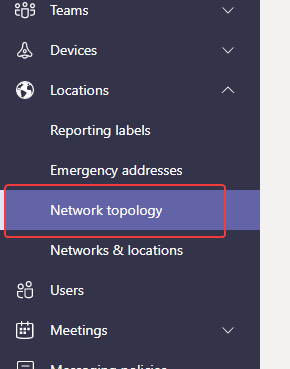
- Navigate to Locations --> Network Topology
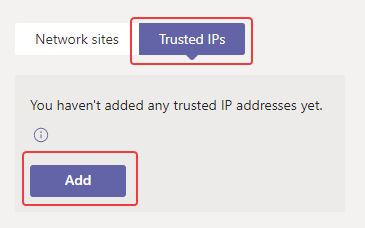
- Select "Trusted IPs" and click "Add"
- Fill in the following fields:
- IP Version - IPv4
- IP Address - 23.96.35.127
- Network Range - 32
- Description - TeamsFire Media IP
- Click "Apply"

- Click "Add" again and fill in the following fields:
- IP Version - IPv4
- IP Address - 104.45.229.220
- Network Range - 32
- Description - TeamsFire SIP IP
- Click "Apply"


Heading - No ToC
Content