

Manage Voicemail Greetings
Overview
🔎 Scope
The following steps will allow you to change your voicemail greeting.
✔️ Requirements
- User Extension
- Voicemail PIN (To manage via phone)
🔗 Links
Managing Via Phone
- From your phone press the Messages key or dial
- 9901 - To manage the phones assigned Voicemail
- 9900 - To manage a different Voicemail - Prompts for extension and pin
- Enter your Voicemail PIN followed by the # key
- Press 6 for the Greetings Menu
- Press 1 to record your new greeting
- Press 1 to record a greeting
- Record your greeting and press # when you are finished
- Press 1 to keep the new recording or press 0 to keep the old greeting
- Hang up the call
Managing Via Manager Portal
- Login to the Manager Portal
- Click the "Messages" button

- Office Managers - Click the "Apps" button at the top then "User Panel"
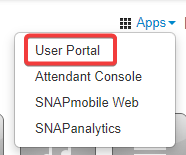
- Office Managers - Click the "Apps" button at the top then "User Panel"
- Click on "Settings"

- Click on the "Speaker Icon" next to Voicemail Greeting

- Choose how you want to set your new greeting:
-
Text to Speech
- Type in the desired message and choose a preferred voice. Users may select the play button to listen to the final result.
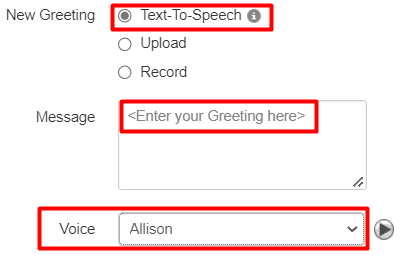
- Type in the desired message and choose a preferred voice. Users may select the play button to listen to the final result.
-
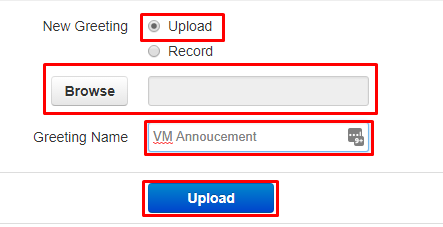
Upload
- Click "Browse" to upload any pre-recorded WAV or MP3
- Enter a Greeting Name
- Click "Upload"
-
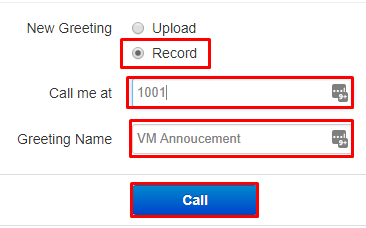
Record
- Enter your extension number or external phone number to record your greeting from
- Enter a Greeting Name
- Click "Call"
- Follow the instructions
-
- Click "Done"