

Call History & Recordings
Overview
🔎 Scope
This article outlines how to access and review call history.
✔️ Requirements
- Access to Manager Portal
- NOTE:
- Simple Users, Basic Users, and Call Center Agents may only see their own call history.
- Call Center Supervisors and Site Managers may see the call history and recordings for the users under them.
- Office Managers may see the call history and recordings for all users.
🔗 Links
- Manager Portal
Access Call History & Recordings
- Login to the Manager Portal
- Click the "Call History" button

Call Recordings
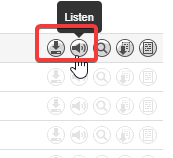
- Next to the call you would like to listen to or download, click the appropriate icon.
Filter Call History & Recordings
- Click the "Filters" button

- Set the filter options appropriate for your search and click "Filter" button
NOTE: The time frame is limited to a 31-day range. For example, users may search from 01/01 - 01/31, however, they may not search 01/01 - 02/-28.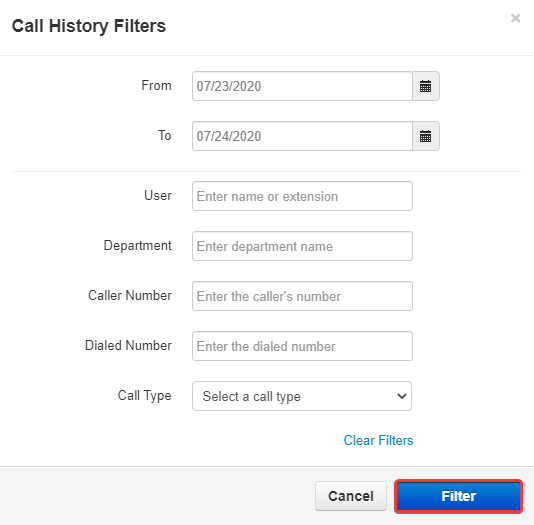
- Export - If you wish you may export the call history to a CSV file by clicking on the "Export" button


Explanation of Fields
| Field Name | Access Level Needed | Definition |
|---|---|---|
| Number | Simple User, Basic User, Call Center Agent | The number dialed (outbound calls) OR The caller number (Inbound calls) |
| Name | Simple User, Basic User, Call Center Agent | The caller's name (inbound calls) or contact name (outbound calls |
| Date | All Users | Date & Time the call began |
| Duration | All Users | Length of the call (minutes:seconds) |
| PAC | All Users | Account Code Used (if any) |
| From Name | Office Manager or higher | Caller's Name or Caller ID |
| From Number | Office Manager or higher | Caller's Phone Number or Extension |
| Dialed | Office Manager or higher | Number dialed by caller |
| To | Office Manager or higher | Final destination of call before it ended. For information on System or SpeakAccount, see below |
Understanding "To"
- System - a response from the backend that prompts when a call does not route off the AA when the caller does not prompt a DTMF keypress to be routed, eventually, the system will hang up on the user or the user hangs up the call on their end.
- SpeakAccount - a response that comes after the call is routed to its destination and the caller is prompted with a "please press 1 to dial another extension" response usually after leaving a voicemail.
Retention Policy
- Call History - 1 Year Retention, anything past that is removed/deleted from the system.
- Call Recordings - 30 days retention
- Call Traces and QoS - 7 days - Tech Support access only