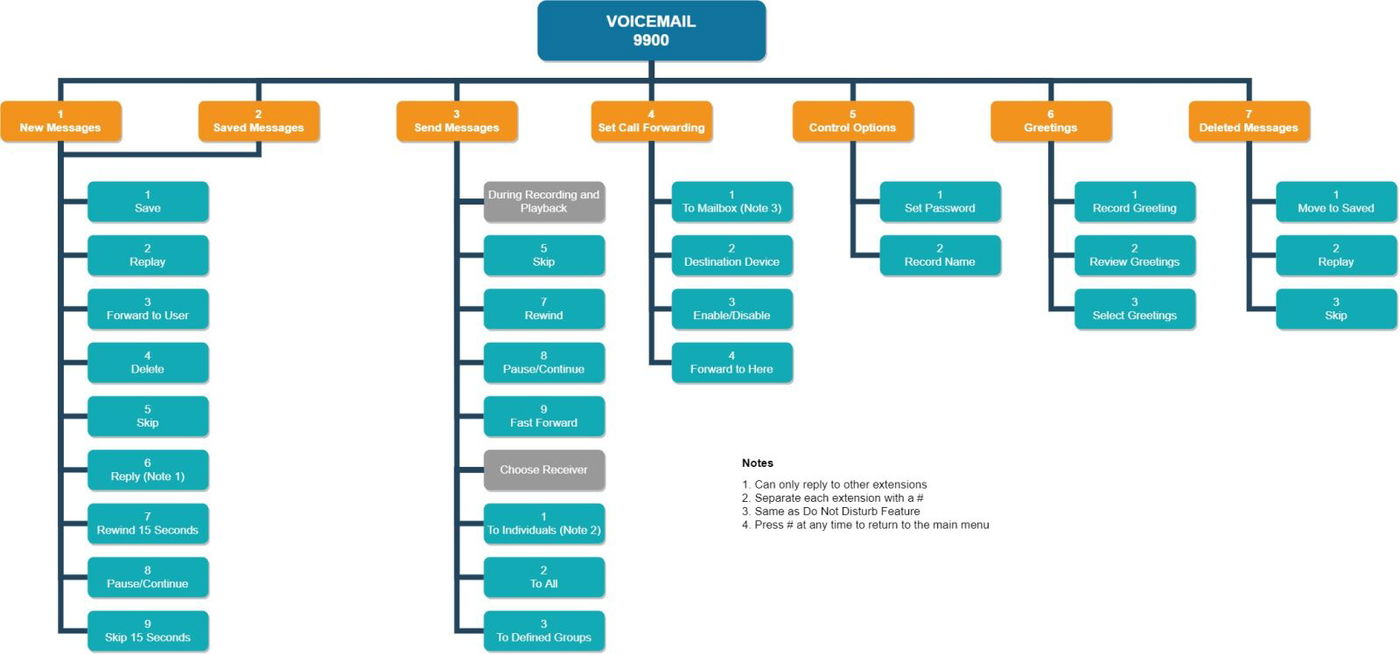

Voicemail Menu
Overview
🔎 Scope
This article covers the voicemail menu options when checking voicemail via phone.
✔️ Requirements
- Extension with voicemail enabled
- Voicemail pin for the extension
Connecting to the Voicemail System
- From a desk phone
- To check voicemail for the extension of the desk phone
- Press the message button. (Typically looks like an envelope or a recording icon)
- Or dial 9901
- To check voicemail for a different extension
- Dial 9900
- When prompted for account number - enter the extension of the voicemail to check followed by #
- Enter the pin for the extension to check.
- Dial 9900
- To check voicemail for the extension of the desk phone
- From an off-net phone (Ex: cell phone, home phone, etc)
- Call into the Auto Attendant (AA) that was setup to allow remote voicemail access.
- Press the option for voicemail management.
- This is not setup on accounts by default.
- A user with Office Manager access can set this up or contact support to have it setup.
- This is not setup on accounts by default.
Voicemail Menu